Give AI an instruction manual for your family calendar
Create a family logistics file, connect it to your calendars, and use AI to propose coverage and make the assignments after you approve them.
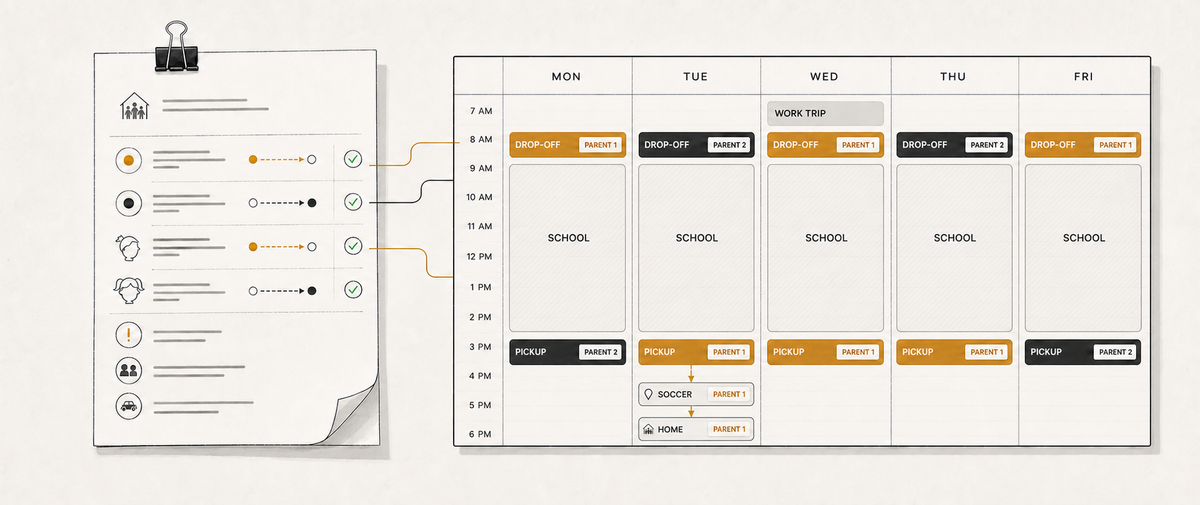
A friend recently asked our group chat how people manage the family calendar. He and his wife needed to coordinate pickups and drop-offs, avoid scheduling work dinners on the same night, and make sure one of them was home with their child.
People shared the tools that work for them. Shared Google and iCloud calendars. A Skylight display in the kitchen. Calendar access for an assistant. Siri for adding events on the move.
I shared how my family handles the next part. We use AI to work through the assignments, check the logistics, and update the calendar without manually creating a week or month of invites.
Our setup has two sources of truth.
- The calendar holds what is happening this week.
- A family logistics file holds how we decide who does what.
The file describes our defaults, exceptions, travel times, and what should happen when two reasonable rules conflict. AI reads it alongside the live calendar, proposes a plan, and, after we approve it, updates the calendar.
This is how to build your own version.
What you need
Start with one calendar that contains the events your household coordinates. A dedicated family calendar is easiest to manage, but a collection of shared personal calendars can also work.
You also need an AI tool and somewhere persistent to keep its instructions.
- In Claude or ChatGPT, use a Project and save the instructions there.
- In Claude Code or Codex, create a family logistics folder and save the instructions as
CLAUDE.mdorAGENTS.md.
Your AI also needs permission to read and update the calendar. That access might come through a built-in Google Calendar connector, an MCP server, or a command-line tool. Confirm that it can create events, update existing events, and add attendees. If it can only read the calendar, this workflow won't remove the calendar work.
Build the instruction file through an interview
Don't sit down and try to write every family rule from memory. Have the AI interview you one question at a time.
Concrete stories produce better instructions than abstract questions. Describing what happened last Tuesday will reveal more than answering, “What are our pickup rules?” The interview should extract a rule from the story, ask whether it is firm or merely preferred, then ask what overrides it.
Paste this prompt into your AI tool.
Help me create a family logistics instruction file that you can use when
planning pickups, drop-offs, activities, and calendar coverage.

Interview me one question at a time. Do not write the file until the
interview is complete.

Start by asking where the file will live and who can access it. Warn me
before recording sensitive details in a shared or synced location.

Cover these areas:

1. The adults, children, schools, caregivers, and calendars involved.
2. Recurring locations, addresses, travel modes, and realistic travel times.
3. Default responsibility when nothing unusual is happening.
4. Conflict days, overflow coverage, and how we divide the work fairly.
5. Which rules are firm, which are preferences, and which rule wins when
   two rules conflict.
6. A worked example from a difficult day that shows how those rules apply.
7. How calendar events record responsibility through attendees, title
   prefixes, colors, or another convention.
8. Whether travel time should be a separate calendar block.
9. Recurring schedules and the date each seasonal schedule expires.
10. Details a competent new caregiver would still get wrong, such as the
    correct entrance, pickup point, provider, or authorized name.
11. What calendar tools you can use in this session. Verify that you can
    create and update events, add attendees, and handle recurring events.
    Record what requires my approval and anything the tools cannot do.
12. Mistakes you have made with this calendar before and the warning or
    workaround that should prevent each one.

When I state a rule, ask whether it is firm or preferred and what beats it.
When my answer is vague, ask for a recent example.

The finished file should state that the live calendar is the source of truth
for what is scheduled. The instruction file is the source of truth for how
to decide. Use present tense, invent nothing, and give every seasonal schedule
an expiry date.
Budget 10 minutes or so for this conversation. Most families have more tacit scheduling knowledge than they expect.
What a useful rule looks like
“Alternate pickups fairly” sounds reasonable but gives the AI very little to work with.
A useful rule is specific enough to apply and includes its exceptions.
- Our caregiver is primary for the younger child's afternoon travel.
- When both pickups can happen sequentially in Brooklyn, the caregiver
  handles both.
- When the pickups overlap, the caregiver stays with the younger child and
  a parent handles the older child.
- Parent coverage rotates across the week.
- The parent carrying the longer afternoon trip should not also handle the
  morning drop-off. This rule takes priority over the preferred rotation.
Your rules will differ. One family might protect dinner coverage. Another might prioritize a parent's fixed office days or a child's comfort with a particular caregiver. The goal is to record the decisions you already make, including the exceptions that normally live in one person's head.
Connect the calendar carefully
Ask the AI to inspect its calendar tools and explain what it can read and change. Test the connection by having it create one labeled test event, add you as an attendee, update the time, and remove it.
Your mileage will vary by model. I use Opus or Fable from Anthropic with auto mode, or GPT-5.6 Sol from OpenAI, and haven't had an issue. This works for me, but I make no assurances about another model or calendar setup.
Add any limits you care about to the instruction file. For example, mine says never to delete an event without explicit direction and not to email people when assigning them to events.
Document any tool-specific behavior involving attendees, recurring events, and reassignment. The AI can read the calendar and propose assignments without asking. It should change events only after you approve a specific plan.
Plan the first week
Give it a try with the upcoming week. Ask for a proposal before permitting any changes.
Read the family logistics instructions, the family calendar, and the relevant
personal calendars for next week.

Identify the days where coverage is incomplete or two responsibilities
conflict. Propose assignments using the rules in the file. Include travel
time and explain any case where a firm rule or preference had to give way.

Present the plan as a table with the day, event, responsible person, travel
block, and reason for the assignment.

Do not change the calendar yet. Wait for my approval.
Access to the associated calendars also lets the proposal account for commitments outside the usual family rotation. My wife is traveling for work one day this week. That trip is on our family calendar, so the proposal knew to assign me both drop-off and pickup that day instead of mechanically following the normal rotation.
That longer prompt makes the job clear, but these aren't magic incantations. Once I open a session with the logistics file in context, I frequently just say, “Give me a proposal for coverage of next week.” The useful part is the context and the idea behind the request, not reproducing an exact set of words every time.
Once the plan is right, approve the calendar changes with a bounded instruction.
Apply only the assignments and travel blocks in the approved table.
Do not modify any other events. Never delete or cancel an event. If you
cannot apply the plan within those limits, stop and tell me why. Show me a
list of every event you created or changed when you are done.
Again, that's the fully specified version. After reviewing a proposal, I frequently just say, “Make those assignments.” The logistics file and the preceding conversation already supply the constraints.
As with everything in AI, your outcomes are a function of the tools and the appropriate context. The calendar connection supplies the tools. The logistics file and the conversation supply the context.
Then inspect the calendar yourself. Check the attendees, times, locations, and any recurring events that were changed.
Improve the file when the plan is wrong
Your first instruction file won't be perfect. Completely normal.
Make updates to the logistics file with whatever guidance it becomes apparent was missing. Then run another real week. A couple of rounds and it should be pretty solid.
After that, the weekly routine becomes short.
- Keep the family calendar current.
- Ask the AI to review the next week and propose coverage.
- Resolve the few decisions that require human judgment.
- Approve the bounded set of calendar changes.
- Add any newly discovered rule or exception to the instruction file.
For me, deciding who does what is the smaller task. Having AI make all the assignments across a week of pickups for two children takes a substantial amount of calendar work off my plate.
P.S. Once your calendar is connected, you can do other things like scan for activities without locations, use past events to find the likely address, and save confirmed locations for recurring activities in the logistics file.