The Content Engine
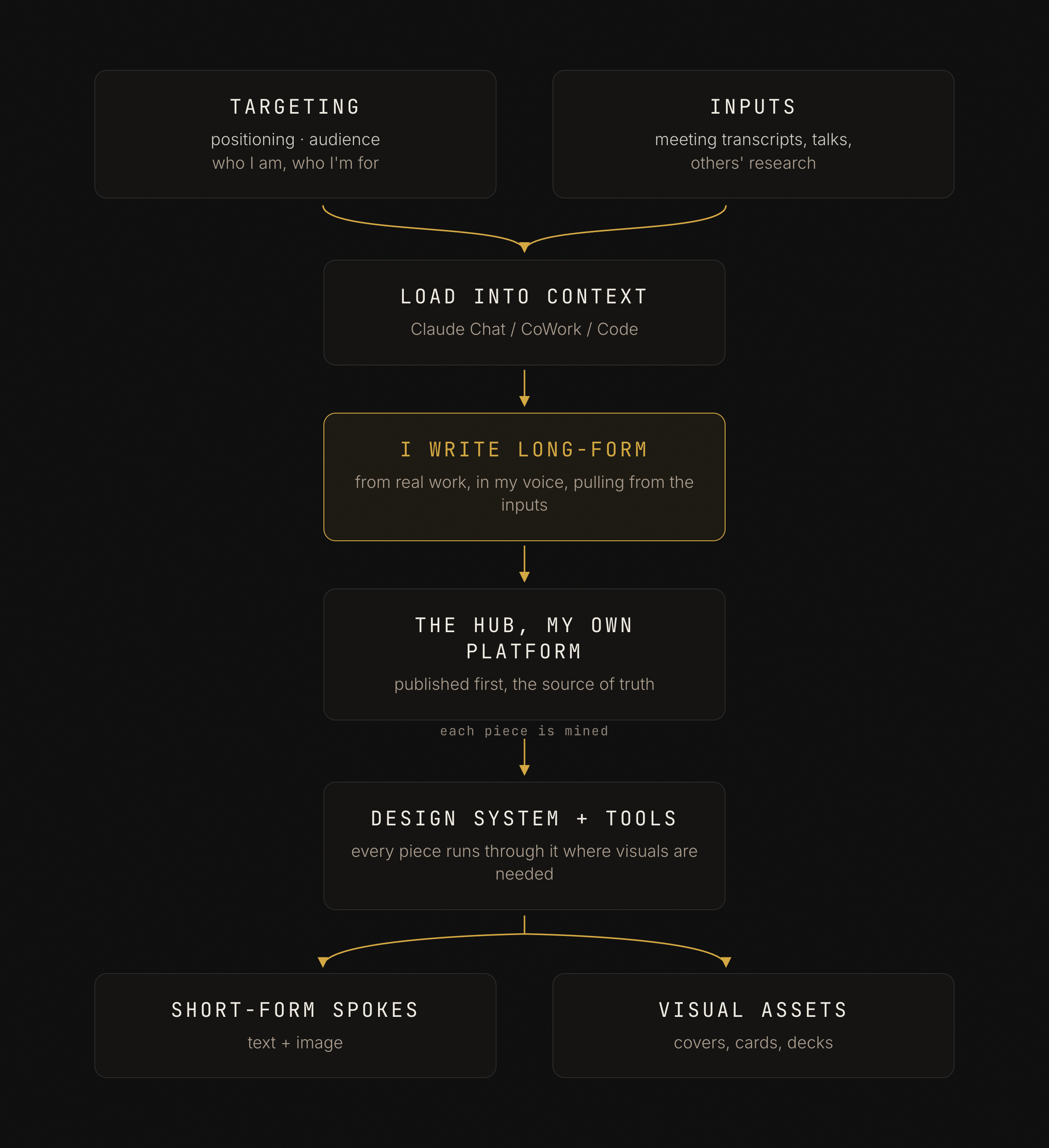
A walkthrough of the system I use to produce content. A couple of short docs aim it, I write long-form from real work on a platform I own, and each piece gets mined into posts and visual assets. It doubles as a build guide, in the order you'd build it.

A walkthrough of how I produce content. What aims it, what feeds it, and how one piece of writing becomes many outputs. It doubles as a build guide, in the order you would build it. Each stage names the doc you write, a minimal version you can copy, and how it gets into the process.
In one line, a couple of short docs aim what I make, I write long-form from real work on a platform I own, and each piece is mined into short-form posts and visual assets. Those docs sit in context every time I create, so the system runs instead of just existing.
1. The targeting docs
A couple of short standing documents keep the content coherent instead of chasing the timeline. You do not need many, and you do not need them long. They live in your AI's context window every time you create, so a tight one-pager that is always loaded beats a twenty-page report that crowds everything else out.
Positioning (who you are)
What you do, who you serve, and what you do that the alternatives cannot. This is the one I would not skip.
# Positioning

What I sell, in one sentence:
  e.g. "I get product and engineering teams actually using AI."

Who I serve:
  the specific buyer, and who actually signs

What I do that the alternatives can't:
  the wedge, in a line
Audience (who you are creating for)
Who you are writing to and, more important, the words they use about their own problem, so a post gets written to be recognized by exactly those people.
# Audience

Who they are:
  role, seniority, company shape.
  mine: "smart tech people who can't follow the AI scene breathlessly"

The words they use for their own problem:
  their language, not yours
2. The inputs
Examples and evidence you draw on while writing. You pull from these to flesh out a piece, rather than generate the piece from them.
- Meeting transcripts. Calls and conversations, synced automatically, so the arguments you make out loud become source.
- Talks I've given. Your own thinking, already worked out for an audience.
- Collected research. Writings, interviews, and talks by others, filed as you find them.
3. Load it into context
The docs above only help if they are in front of the model when you create.
Pick the mechanism that matches your tool, and keep the docs there.
- A Claude Chat project. Upload the docs as project knowledge. Every chat in the project writes with them loaded.
- A Claude CoWork project. Keep the docs in the project folder so the work always starts from them.
- A Claude Code repo. Keep the docs in the tree and reference them from a
CLAUDE.mdso they load on every session.
4. Writing the long-form
Long-form is the center of gravity, and it is the part that is actually me. I write it from real work first, a client problem, a live pitch, something I built or broke. I pull examples, evidence, and sharper language from the inputs to flesh out a piece.
A short guidance doc keeps the writing consistent, written once so the voice stays mine. Like the targeting docs, it only works when it sits in context, so load it the same way (the Claude Chat project, CoWork project, or Code repo from step 3). That is what lets the model's feedback while you draft come from your own guidance rather than generic writing advice. Voice, bans, and rubric are equal parts of it.
- Voice and style. Practical and applicable, things people can use. Built on my own experience, so it is work only I can write. No thought-leader filler that anyone could produce.
- Hard bans. The lines no draft crosses. No em-dashes, no colon setup/payoff, no filler.
- Draft rubric. A short checklist you grade every draft against before it ships.
# Writing guidance (kept in context, every draft graded against it)

Voice and style:
  2 to 4 lines, how it should sound, in your words

Hard bans:
  e.g. no em-dashes, no colon setup/payoff, no filler

Draft rubric:
  a short checklist you grade against before it ships
5. The hub, the platform you own
I publish the finished essay first to a platform I own. That stays the source of truth for everything else.
I do this to grow an audience that is mine, not for the traffic. The reach lives where people already are, which is what the spokes are for.
6. The design system, a stage every piece passes through
After the essay is written, I look to leverage those pieces by syndicating images or derived pieces from them. Each piece runs through the design system on the way to becoming a spoke or an asset, wherever a visual is needed. Often that is a cover, a card, a carousel, a PDF, or slides.
- One visual language across the site and every asset, so a cover and a social card read as the same brand. Near-black background, cream text, a single gold accent, a serif display face with a mono label, a faint noise texture.
- Assets built as code. Each is an HTML and CSS template rendered to an image by a script, consistent and fast at volume. Cards and covers render from templates; carousels export to a single PDF.
- Publishing tools. A script that pushes a draft to the newsletter and uploads its images, plus command-line posting for the social spokes.
7. Derivatives, where the people already are
One long-form piece becomes many outputs. The essay is the source, and each spoke stands on its own while pointing back to it.
- Short-form spokes. Each essay spawns platform-native posts, a LinkedIn version, a Threads version, a Bluesky version, each in that platform's voice rather than a copy-paste. The spokes are generally text, frequently paired with an image asset. Threads and Bluesky in particular need a personal, conversational register, calibrated against recent posts.
- Visual assets. A quote card, a cover, or a document carousel per piece.
Two written standards keep the assets working. The hook standard, where the first frame works before any context or it is an illustration rather than a hook. And the artifact standard, where every slide survives alone, stays pure punch or pure structure, and ports real tables and numbers from the source instead of flattening them into captions. This lives in another markdown file in context for creation of assets and derivatives.
If you want to build one
- Write the targeting docs first. Positioning (who you are) and audience (who you are creating for). Keep each tight enough to stay loaded.
- Load them into context. A Claude Chat project, a Claude CoWork project, or a Claude Code repo, so they sit in front of the model every time you create.
- Keep your inputs in one place. Transcripts, talks, and others' research, filed as you go.
- Write long-form from real work, often, in your own voice. You write the piece; the inputs flesh it out, they do not produce it.
- Publish first to a platform you own. The audience you grow there is yours, even as the reach lives on the spokes.
- Build a small design system. One visual language, rendered as code, that every visual passes through.
- Derive, do not redraft. Run each piece through the design system into short-form posts and image assets, each in the platform's voice, posted where people already are.